Gantt chart maker
Write the plan in sentences. Get the Gantt chart.
Skip building a Gantt chart cell by cell. Describe the phases, tasks, durations and what waits for what, and get the chart — with the dates taken from your text.
- Price
- Free account · no watermark
- Runs in
- Your browser — nothing to install
- AI
- Your text goes to the model only when you click Generate
Runs on the MindMax web editor →All online tools
The website redesign starts on 2 November 2026. Research begins with user interviews (7 days) alongside a competitor review (5 days). Once the interviews are done, design starts with the information architecture (5 days), followed by visual design (10 days). Frontend development takes 15 days after visual design; content migration starts after the information architecture and takes 12 days. Testing takes 5 days, and then the site launches.
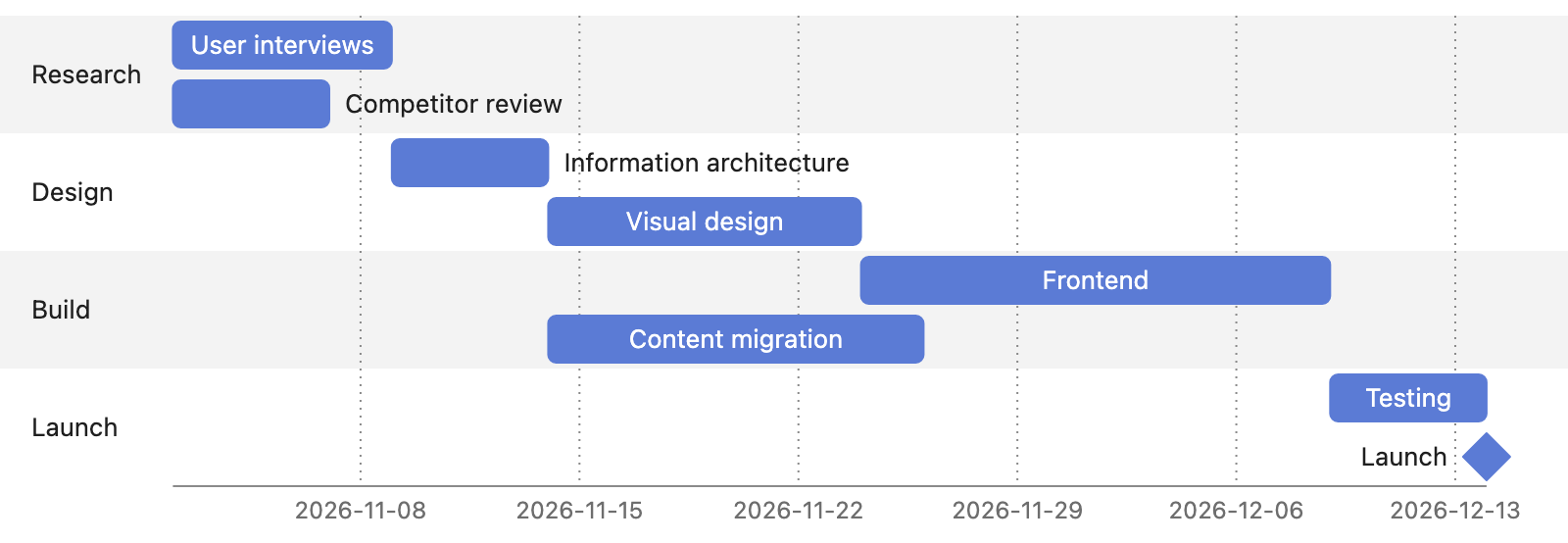
Four steps
Paste the plan
Start date, tasks, how long each takes and what has to finish first.
Pick Gantt chart and generate
Phases become sections; “after the interviews” becomes a dependency.
Check and adjust
“Give design two more days” or “run testing in parallel”.
Export
Word, PDF, PNG or SVG.
Check every node against your text
AI diagram tools draw something plausible. This one keeps the receipts: each box carries the sentence it came from.
- Turn on Check and click a node — the editor jumps to the sentence it came from and highlights it. Nodes with no supporting sentence are drawn dashed.
- Ask for a change in one sentence — “split step 3 into two”, “only keep the key steps”, “make it a mind map” — and review the new diagram before it replaces the old one.
- Export Word or PDF and the diagram goes in as a picture, in the same font and colours as the text around it. Download PNG or SVG, or copy it as an image.
Where it gets hard
- Generating needs a free account
Pasting, editing and exporting need no account. The AI step does: sign in with a free account to generate or revise a diagram.
- It draws only from what you paste
The web editor works from the text in front of it. It does not search the web or read your other files.
- Complex diagrams may need a second pass
Diagrams are Mermaid underneath. A tangled process can come out busier than you want — one sentence of revision usually fixes it.
- Your text goes to the model when you click Generate
Otherwise the document stays in this browser. Clearing site data or switching browsers means it is not there — export what you want to keep.
Common questions
What if my plan has no exact dates?
It anchors on the one start date your text gives and chains the rest by order and duration. It does not invent calendar dates beyond that.
Can it show milestones?
Yes — a launch or a sign-off with no duration is drawn as a milestone.
Is it free?
Editing and exporting are free with no account. Generating needs a free account.
Write the plan in sentences. Get the Gantt chart.
Free account for the AI step; no watermark on anything you export.