Text to mind map
Paste the text. Get the mind map. Check every branch.
Turn notes, a chapter summary or a long article into a mind map — topic in the middle, main points as branches, details underneath — with each branch linked to the sentence it came from.
- Price
- Free account · no watermark
- Runs in
- Your browser — nothing to install
- AI
- Your text goes to the model only when you click Generate
Runs on the MindMax web editor →All online tools
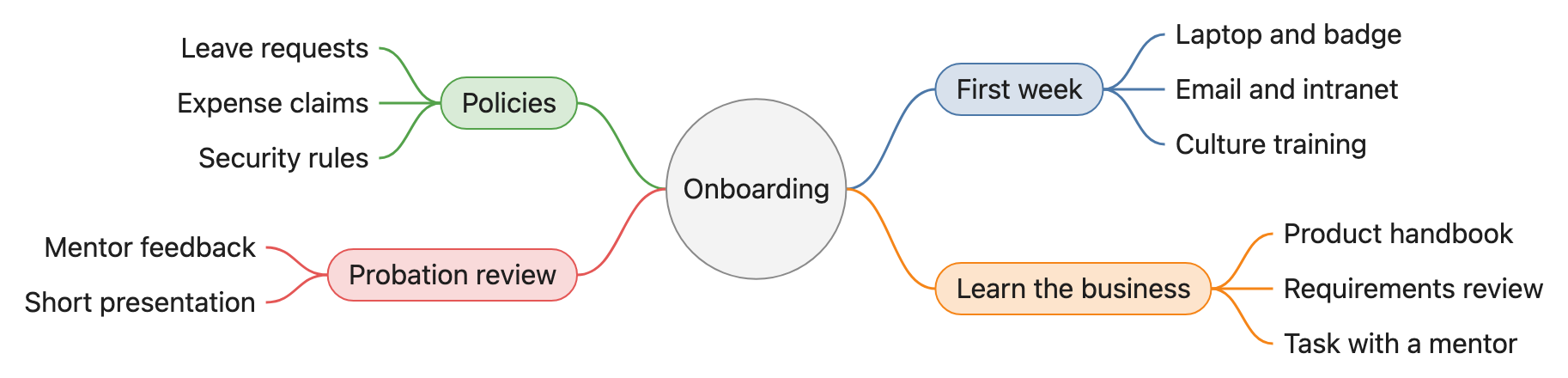
In the first week, new hires collect their laptop and badge, set up email and intranet accounts, and attend the culture training. To learn the business, they read the product handbook, sit in on a requirements review, and take on a small task with a mentor. On policies, they need to know leave requests, expense claims, and the security rules. The review at the end of the three-month probation covers mentor feedback and a short presentation.
Four steps
Open the editor and paste
Paste the text you want mapped: lecture notes, a book summary, a meeting record.
Pick Mind map and generate
The AI picks the main points and the details under each, keeping your own words where it can.
Check and adjust
Click a branch to see its sentence; ask for changes in a sentence — “merge the last two branches”.
Export
Word, PDF, PNG or SVG — or copy the map as an image.
Check every node against your text
AI diagram tools draw something plausible. This one keeps the receipts: each box carries the sentence it came from.
- Turn on Check and click a node — the editor jumps to the sentence it came from and highlights it. Nodes with no supporting sentence are drawn dashed.
- Ask for a change in one sentence — “split step 3 into two”, “only keep the key steps”, “make it a mind map” — and review the new diagram before it replaces the old one.
- Export Word or PDF and the diagram goes in as a picture, in the same font and colours as the text around it. Download PNG or SVG, or copy it as an image.
Where it gets hard
- Generating needs a free account
Pasting, editing and exporting need no account. The AI step does: sign in with a free account to generate or revise a diagram.
- It draws only from what you paste
The web editor works from the text in front of it. It does not search the web or read your other files.
- Complex diagrams may need a second pass
Diagrams are Mermaid underneath. A tangled process can come out busier than you want — one sentence of revision usually fixes it.
- Your text goes to the model when you click Generate
Otherwise the document stays in this browser. Clearing site data or switching browsers means it is not there — export what you want to keep.
Common questions
Can it make a mind map from a whole article?
Yes, up to about 8,000 characters at a time. Paste the article and pick Mind map; the main sections become branches.
Will it add points that are not in my text?
It is told not to, and every branch it draws is checked against your text: branches with no supporting sentence are shown dashed in Check mode, so you can see them.
Is it free?
Editing and exporting are free with no account. Generating needs a free account.
Paste the text. Get the mind map. Check every branch.
Free account for the AI step; no watermark on anything you export.