Text to chart
Paste the numbers. Get the chart. Not one figure made up.
A paragraph full of figures, or a table — get a bar, line or pie chart back, with every value checked against what you pasted. Select a table in the editor and Data chart moves to the top of the menu.
- Price
- Free account · no watermark
- Runs in
- Your browser — nothing to install
- AI
- Your text goes to the model only when you click Generate
Runs on the MindMax web editor →All online tools
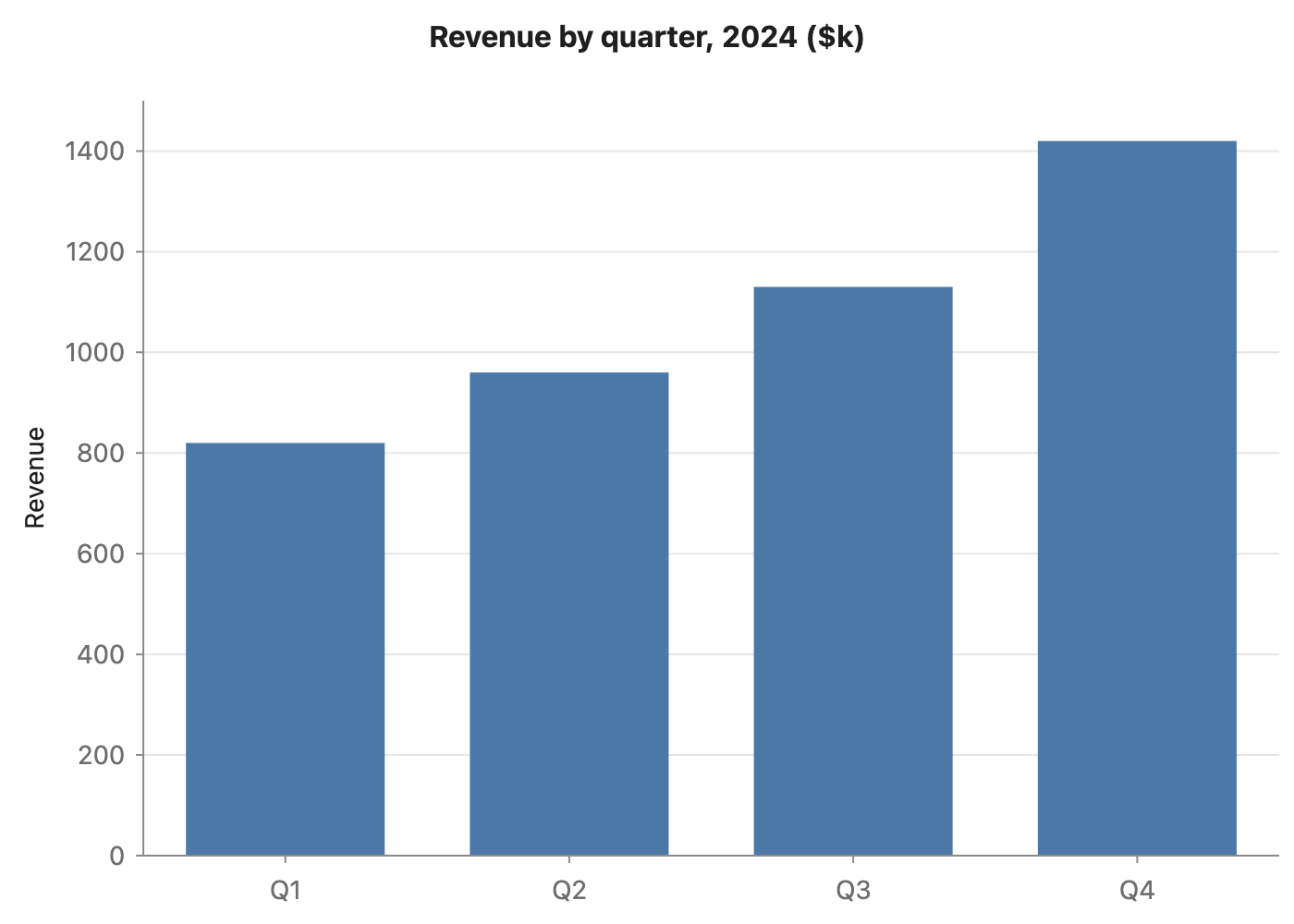
Revenue grew every quarter in 2024: $820k in Q1, $960k in Q2, $1130k in Q3 and $1420k in Q4.
Four steps
Paste the figures
A sentence like “Q1 was 820, Q2 960…” or a Markdown or spreadsheet table.
Pick Data chart and generate
Bars or lines for values over time or categories, a pie for shares of one whole.
Check the numbers
Every value carries the sentence it came from. A value that is not in your text gets a line under the chart that you cannot switch off.
Export
Word, PDF, PNG or SVG.
Check every node against your text
AI diagram tools draw something plausible. This one keeps the receipts: each box carries the sentence it came from.
- Turn on Check and click a node — the editor jumps to the sentence it came from and highlights it. Nodes with no supporting sentence are drawn dashed.
- Ask for a change in one sentence — “split step 3 into two”, “only keep the key steps”, “make it a mind map” — and review the new diagram before it replaces the old one.
- Export Word or PDF and the diagram goes in as a picture, in the same font and colours as the text around it. Download PNG or SVG, or copy it as an image.
Where it gets hard
- Generating needs a free account
Pasting, editing and exporting need no account. The AI step does: sign in with a free account to generate or revise a diagram.
- It draws only from what you paste
The web editor works from the text in front of it. It does not search the web or read your other files.
- Complex diagrams may need a second pass
Diagrams are Mermaid underneath. A tangled process can come out busier than you want — one sentence of revision usually fixes it.
- Your text goes to the model when you click Generate
Otherwise the document stays in this browser. Clearing site data or switching browsers means it is not there — export what you want to keep.
Common questions
Will it invent numbers?
It is told not to, and every number in the chart is matched against your text. If a value has no match, the chart says so underneath — that line stays until the number is fixed.
Does it convert units?
No. Converting “1.2 billion” to “1,200 million” is a rewrite, so the chart uses the numbers exactly as written.
Is it free?
Editing and exporting are free with no account. Generating needs a free account.
Paste the numbers. Get the chart. Not one figure made up.
Free account for the AI step; no watermark on anything you export.