Text to timeline
Paste the story. Get the timeline.
Turn a company history, a project log or a chapter of history into a timeline — periods in order, what happened in each one underneath — with every event linked to the sentence it came from.
- Price
- Free account · no watermark
- Runs in
- Your browser — nothing to install
- AI
- Your text goes to the model only when you click Generate
Runs on the MindMax web editor →All online tools
The company was founded in Austin in 2016 with five employees. In 2018 it launched its first product, Notely, and passed 100,000 users that year. In 2020 it closed a Series A round and opened an office in Toronto. In 2022 it released an enterprise edition. By 2024 it had more than 3 million users and entered the Southeast Asian market.
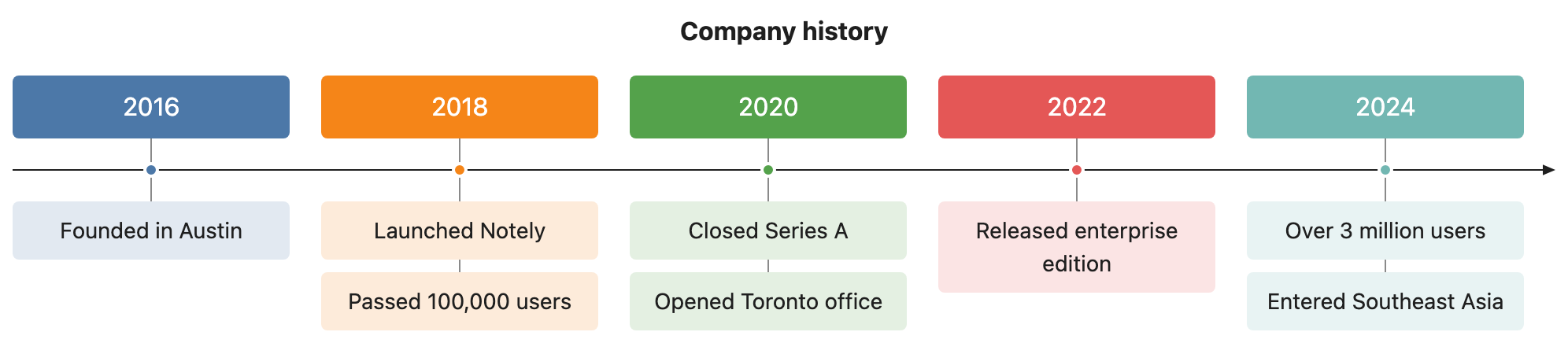
Four steps
Paste the text
Anything with dates or periods in it: a history, a changelog, a biography.
Pick Timeline and generate
Dates become points on the line; what happened then goes underneath, in your own words where possible.
Check and adjust
Click an event to see its sentence; “merge 2019 and 2020” revises it.
Export
Word, PDF, PNG or SVG — or copy it as an image.
Check every node against your text
AI diagram tools draw something plausible. This one keeps the receipts: each box carries the sentence it came from.
- Turn on Check and click a node — the editor jumps to the sentence it came from and highlights it. Nodes with no supporting sentence are drawn dashed.
- Ask for a change in one sentence — “split step 3 into two”, “only keep the key steps”, “make it a mind map” — and review the new diagram before it replaces the old one.
- Export Word or PDF and the diagram goes in as a picture, in the same font and colours as the text around it. Download PNG or SVG, or copy it as an image.
Where it gets hard
- Generating needs a free account
Pasting, editing and exporting need no account. The AI step does: sign in with a free account to generate or revise a diagram.
- It draws only from what you paste
The web editor works from the text in front of it. It does not search the web or read your other files.
- Complex diagrams may need a second pass
Diagrams are Mermaid underneath. A tangled process can come out busier than you want — one sentence of revision usually fixes it.
- Your text goes to the model when you click Generate
Otherwise the document stays in this browser. Clearing site data or switching browsers means it is not there — export what you want to keep.
Common questions
What if the text has no exact dates?
Periods can be years, quarters or phases — whatever your text uses. It does not invent dates your text does not give.
How many events fit?
About ten periods with a few events each stays readable. For a long history, draw one era at a time.
Is it free?
Editing and exporting are free with no account. Generating needs a free account.
Paste the story. Get the timeline.
Free account for the AI step; no watermark on anything you export.